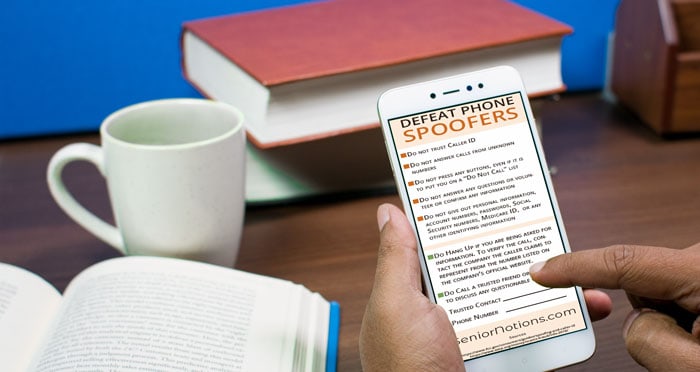
I used to think I was pretty resistant to phone scams. I knew not to give out personal information to anyone who called me — no Social Security number, no Medicare number, no account details — no matter how official they sounded. I assumed that was enough.
What I didn’t fully understand until later was that the Caller ID readout can be manipulated.
As we age, the pace of information and the pressure to respond quickly can feel heavier, and it took me some time to notice that pausing was actually an option.
The thing I learned had a name
There’s a practice called caller ID spoofing. It means a caller can deliberately make their call appear to come from a number — or a name — that isn’t really theirs. It can look like the IRS, a police department, a government agency, or even your own child’s phone number. I didn’t know this was possible for a long time.
When recognition matters more than confidence
We’re often told, “You’d know better,” or “You’d never fall for that.” But situations that create fear or urgency don’t give us time to reason carefully. Knowing that caller ID can be faked changes how we interpret those moments.
What spoofing can look like
Sometimes spoofing shows up as:
-
A call that appears to come from a government agency
-
A local number that feels familiar
-
A call that looks like it’s coming from someone you know
The number on the screen can be convincing. That’s the point.
What helps, without making life smaller
What’s helped me most isn’t memorizing rules — it’s having permission to pause.
If a call asks for money or personal information:
-
Hanging up is allowed
-
Calling back using a number you already trust is allowed
-
Checking with someone else before acting is allowed
No legitimate organization will punish you for double-checking. I’ve hung up on calls that sounded real, then called the company directly using a number I already had. Each time, the person I reached understood exactly why I did that.
When the phone keeps ringing
There are periods when it feels like the phone rings constantly — unfamiliar numbers, silent calls, messages that leave nothing behind. What helped me was letting go of the idea that I needed to answer in order to be responsible.
It’s okay to let unknown numbers go to voicemail.
It’s okay to silence repeat callers.
It’s okay to use call-blocking tools built into your phone or provided by your carrier.
These aren’t signs of avoidance. They’re ways of giving yourself a little quiet back. Most legitimate callers will leave a message. Most important calls will find another way to reach you. Reducing interruptions made it easier to recognize the calls that actually mattered — and to meet them calmly, instead of already on edge.
Letting the important calls through
One worry I had was missing a call from someone I love. What helped was realizing that phones can be set up to treat familiar voices differently than unknown ones — without turning the phone off or silencing everyone.
Saving close family and friends as contacts allows their calls to ring through normally. Some phones also allow calls from contacts, or repeat calls from the same number, to bypass silence settings. That way, the people who know you can still reach you — and the constant background noise fades a little.
It isn’t about perfect filtering. It’s about making space for the calls you’d want to answer.
One quiet safeguard I didn’t think about
I also learned that voicemail can be vulnerable if it doesn’t have a password. Some systems assume that calls from your own number are safe — and that number can be spoofed too. Adding a password to voicemail is a small step, but it closes one more opening.
A steady close
Scams change. The technology changes. But naming what’s happening — this is caller ID spoofing — restores a little steadiness.
You don’t have to be fast. You don’t have to be brave. You just have to give yourself time.
Pausing, noticing, and choosing which calls matter — these small, quiet decisions create a rhythm that lets life continue without giving up connection.